
Beegle has gone live with two new related features, which together improve recall for financial advisers and their staff.
Timeline
Almost any record (individual, account, policy, goal, strategy, etc.) in Beegle now has a timeline. The timeline is used to track things that happen in relation to the record, giving adviser and their staff a complete history of what has happened or been considered in relation to the record.
Currently the timeline allows for the addition of commentary and adviser judgements (noted below), but there is plenty more to come with our next feature releases.
Ultimately, this timeline will become a complete history of everything that has been done or considered for a client, their accounts, goals, policies and financial strategies. All available at the click of a button: no searching file notes or advice documents, no waiting for an AI agent to respond.
Commentary & Adviser Judgement
The first feature added to the timeline is free text commentary and document upload. This can be used to keep track of decisions made or events over time. Easily reviewed and avoiding the need to search for historical information across multiple systems.
We’ve also implemented the ability for an adviser to add a judgement to these commentaries: ‘Unsettled’, ‘Conditional’, or ‘Settled’.
Using these judgements paint a complete picture of how and why a recommendation was made. Not just what was recorded in a file note, but also the thoughts of the adviser.
A simple use case:
A recommendation to change super funds for a new client starts off with the adviser judgment being ‘Unsettled’ and a description stating that we need to get a superannuation rundown and find out if the client has insurances.
Once the account rundown is received it shows the client has insurances in the super fund. A new adviser judgement is added, with a status of ‘Conditional’ and the comment indicating that changing super funds is conditional on getting new insurances.
Once new insurances are in force, a final adviser judgement can be added with a ‘Settled’ status and comment indicating new insurances have been obtained.
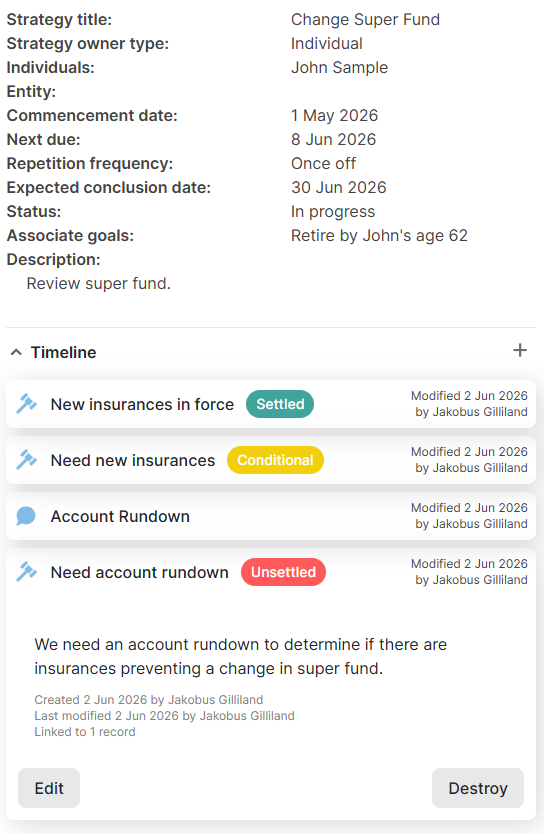
At all times all staff know what is going on, and a full audit record gets built. If the anyone ever questions why a certain decision was made, the information is immediately available. Not only a file note, but also the adviser’s judgement.